Use case
Turn Netflix into Anki Flashcards: Sentence Mining for Language Learners
The best way to remember vocabulary is to encounter it in context—not in a premade deck, but in real scenes from movies and shows you actually enjoy. With Lexisub and Anki, you can extract authentic sentences while you watch, then build a personal flashcard library tailored to your interests and the language patterns you encounter daily.
Language learners have known this for years: mining sentences from native TV beats studying decontextualized word lists. You remember "¿Dónde está la estación?" faster when you've seen it delivered by a character you care about, watched their reaction, and absorbed the scene's emotional weight. Premade Anki decks are generic; your Netflix-mined deck is yours, memorable, and powered by shows you want to watch anyway.
This workflow pairs Lexisub's multiple-subtitle interface with Anki's spaced-repetition algorithm to turn casual watching into serious language acquisition. No extra tools. No busywork. Just watch, save lines that stand out, and let Anki do the memory work.
Why Sentence Mining Beats Premade Decks
Context sticks. When you learn "Je suis occupé" while watching a character explain why they can't meet a friend, you're linking the sentence to tone, body language, and narrative. Your brain files it as a memory, not a vocabulary item. Premade decks strip all that away.
You choose what matters. Prenominal adjectives in Spanish? Medical vocabulary? Slang from Lagos? A premade deck makes educated guesses. With Lexisub, you capture the exact patterns and registers you need. If you watch K-dramas, you'll naturally save formal honorifics and romantic dialogue. Watch news, you'll mine current events vocabulary. You own your curriculum.
Shows are free motivation. You're watching anyway. Sentence mining transforms "guilty pleasure" into "active study." No separate study session required; the content you love becomes the flashcard engine.
The Workflow: Watch → Save → Export → Review
- Watch with Lexisub's multiple subtitles. Open any show on Netflix. Lexisub displays two or more subtitle languages side by side, synced frame-perfectly. Say you're learning Spanish through an English-language show—display English + Spanish. Your native language + target language. Both on screen, always in sync.
- Save lines as they land. When a line resonates—because it's funny, useful, or just the right phrase you've been wanting to nail—click the phrase in either subtitle track, or press the default save shortcut (the letter "s" on your keyboard). Lexisub captures the entire line in every language displayed. One click, every subtitle version is saved. No manual copying.
- Organize by show. Your saved phrases group automatically by series. Watched all of Season 3 of *Dark*? All your German lines sit together. Switch shows, switch phrase sets. Clean, organized, ready to export.
- Export to CSV. Hit export in Lexisub's settings. Choose CSV format. You get a spreadsheet: one column per language, one row per saved line. Download it to your computer.
- Import into Anki. Open Anki (free, open-source flashcard software). Create a new deck or add to an existing one. Use Anki's CSV import feature. Map your columns: source language in Front, native language (or translation) in Back. Customize the card template if you like (add audio, timestamps, show names). Anki converts your phrases into flashcards in seconds.
- Study with spaced repetition. Review your cards daily. Anki automatically spaces them—easy cards reappear in weeks, hard ones the next day. Over months, you absorb hundreds of real sentences, all from shows you chose, all with built-in context.
Pro Tips for Better Flashcards
Save whole lines, not isolated words. "Un momento" is forgettable. But "Un momento, tengo que hacer una llamada" (with the scene of someone stepping away) is a sentence you'll remember. Anki works best with context-rich content. By default, Lexisub saves your entire line—keep it that way.
Include audio. After importing into Anki, add the audio track from the Netflix episode using tools like yt-dlp or Anki's built-in media features. Hearing the actor's delivery while reviewing makes recall exponentially stronger. Anki supports audio fields; use them.
Use the show name as context. Lexisub includes the show title in exports. In Anki, add this to a context field or note type. When you see a card weeks later, knowing it's from *The Crown* vs. *Money Heist* vs. *Stranger Things* helps you reconstruct the scene and remember faster.
Don't edit phrases—keep them authentic. Resist the urge to "fix" grammar or simplify for fluency. Save the exact line as written/spoken. Real language includes hesitations, slang, and colloquialisms. Your brain learns faster from authentic material.
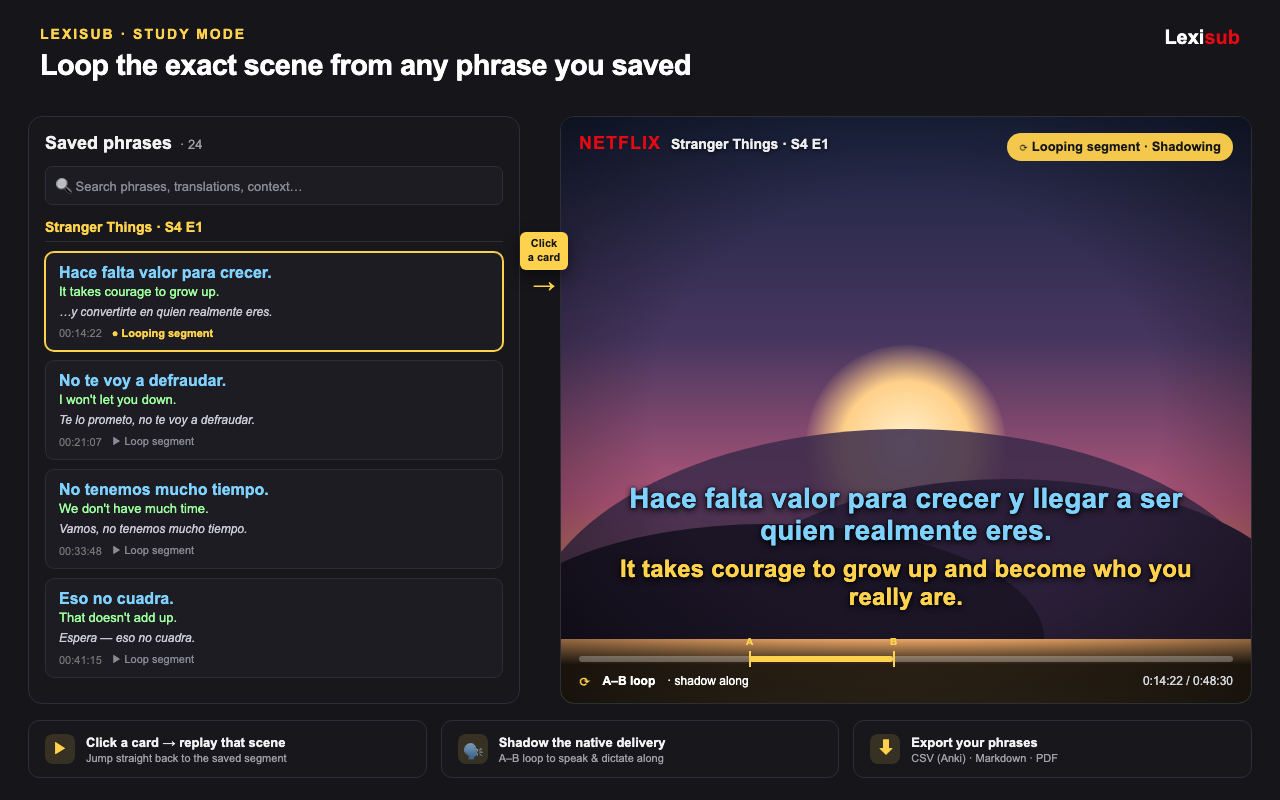
Lexisub Study Mode Tip: While building your Anki deck, use Lexisub's study mode to loop and re-watch saved segments. Split-screen your phrase cards (left) with the Netflix player (right), press A–B repeat on a line, and drill the scene three times before moving on. Then export those hardened memories to Anki for long-term retention.
From Casual Watching to Language Fluency
Sentence mining isn't a hack; it's how language acquisition actually works. Linguists call it "extensive reading" or "comprehensible input"—you meet words in context, your brain generalizes rules, and over time, patterns crystallize into intuition. Anki's spaced repetition ensures you don't forget what you've learned.
Lexisub removes the friction. Multiple subtitles mean you see meaning instantly—no pause, no dictionary lookup, no interruption. One keystroke saves a line forever. One click exports dozens of phrases to flashcards. The workflow vanishes; you're just watching and saving.
Start tonight. Watch one episode with Lexisub and multiple subtitles. Save five lines you genuinely like. Export them. Import them into Anki. Tomorrow, review those five cards. Next week, you'll review them again. In three months, you'll have reviewed them dozens of times, and they'll be in your active vocabulary. That's the power of sentence mining plus spaced repetition, powered by stories you love.
Not sure where to start? Check out our guide for a step-by-step walkthrough, or head to pricing to unlock Study Mode and phrase export on your first watch.
FAQ
Can I use Lexisub's saved phrases with other flashcard apps besides Anki?
Yes. Lexisub exports CSV, Markdown, and PDF. Any flashcard app that imports CSV (Quizlet, SuperMemory, Mnemosyne) will work. Anki is free and powerful, but the choice is yours.
Do I need a Lexisub Pro subscription to export phrases to Anki?
Yes. Phrase export is a Pro feature (€24.99/year or €2.49/month launch promo). The free tier gives you full Netflix multiple-subtitle playback; exporting and Study Mode require Pro.
What if a phrase is in multiple languages? Which one goes on the flashcard front and back?
You decide. In Anki's CSV import, you map columns to card fields. Put your target language (Spanish, French, etc.) on the front and your native language on the back. Anki will ask; you choose the order.