Scan to install on ChromeScan to install on Chrome

Multiple subtitles at once on Netflix.
Learn a language while you watch.

Lexisub overlays your native language and the one you're learning on the same screen — perfectly synced. Click any word to save it, then review your phrases later. Every show becomes a lesson.

Chrome extension · Interface in 12 languages · 14-day full free trial · Cancel anytime

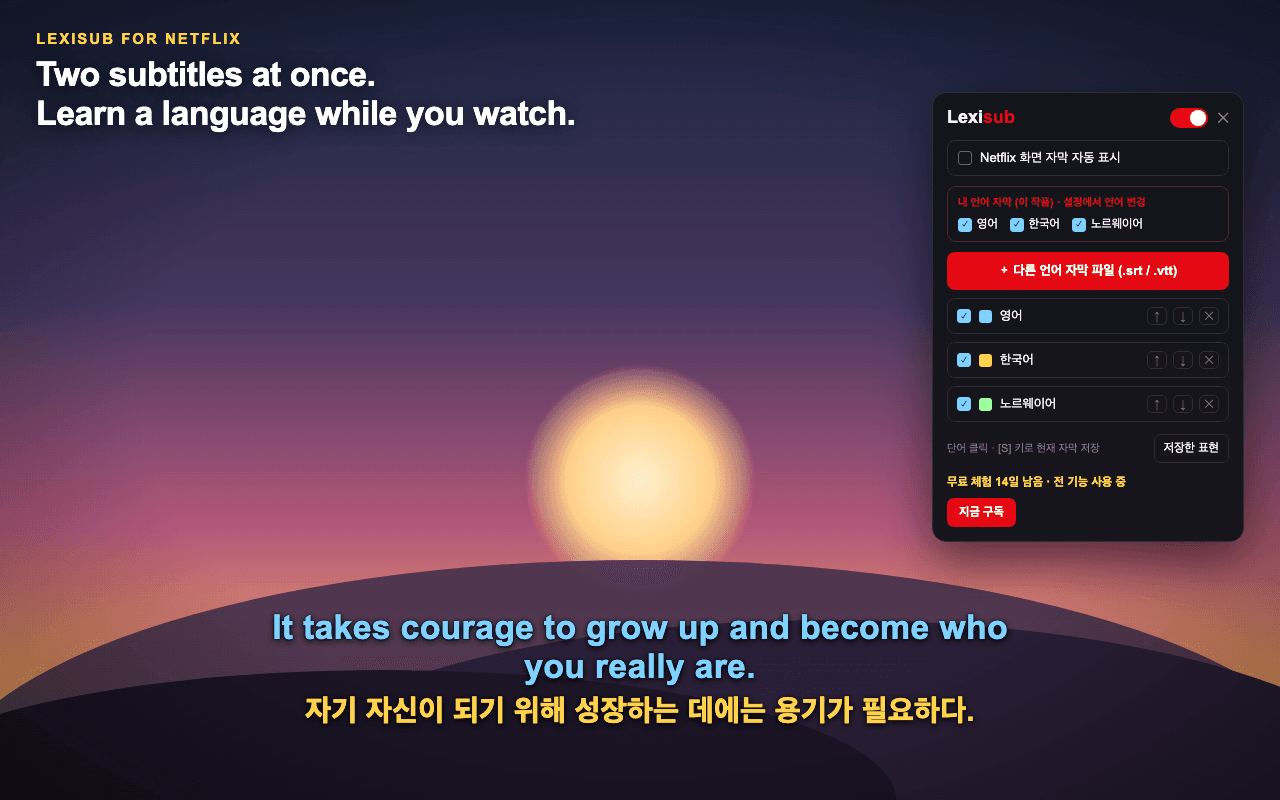
Lexisub on Netflix: multiple synced subtitle lines over the player, with the control panel for picking languages

🎬 Multiple languages, one screen

Your native language and the one you're learning, overlaid on the Netflix player and perfectly synced. Click any word to save the whole line for later.

Get Lexisub

Across languages

How learners use Lexisub

Study scenarios with dual subtitles — from your first episode to fluent, in the language you're already watching.

Dos líneas en pantalla y por fin dejé de pausar en cada frase.
Aprendiendo español con telenovelas
気になった言葉をクリック、意味はその場で。だから記憶に残る。
アニメで日本語を勉強中
K-드라마가 배경 소음에서 매일의 수업이 됐어요.
한국어 학습 중
Enregistrer une phrase, c'est une seule touche. Ma liste de vocabulaire a enfin tenu un mois.
J'apprends le français
Installiert, auf Play gedrückt – läuft. Kein Handbuch, kein Setup.
Ich lerne Deutsch
上面中文,下面我已经会的语言。再也不用对着汉字发懵。
学习中文
Séries brasileiras em velocidade real, com uma rede de segurança. Exatamente o que eu precisava.
Aprendendo português
Due clic e le due lingue erano sullo schermo. Tutta qui la curva di apprendimento.
Sto imparando l'italiano
Официальные дорожки идеально синхронны. Ничего не плывёт — я перестал бороться с инструментом.
Учу русский
अंग्रेज़ी मैं पहले से तेज़ पढ़ता हूँ, तो हिंदी के साथ जोड़ना बढ़िया चलता है।
हिंदी सीख रहा हूँ
سطران، ضغطة واحدة للحفظ، وتصدير إلى Anki. الدورة كاملة في مكان واحد.
أتعلّم العربية
Tôi ra nước ngoài chỉ với tiếng Anh. Giờ phim dạy tôi cách người ta nói thật sự.
Học ngôn ngữ bản địa
Hesap yok, öğretici yok — on saniyede anladım.
Türkçe öğreniyorum
Episode pendek, tonton ulang, simpan frasa yang berulang. Sederhana, dan berhasil.
Belajar bahasa Indonesia
Mijn eigen ondertitels laden lokaal — er wordt niets geüpload. Dat vond ik belangrijk.
Ik leer Nederlands
Det håller sig ur vägen. Verktyget försvinner och serien får undervisa.
Jag lär mig svenska
Własny klucz API — za napisy z AI zapłaciłem grosze, bez narzutu.
Uczę się polskiego
หน้าจอเป็นภาษาผม แทบไม่ต้องตั้งค่าอะไร เริ่มเรียนได้ในหนึ่งนาที
กำลังเรียนภาษาไทย
English audio with English subtitles — I finally catch every word. Huge for listening.
Improving English
Bor i Norge med bare engelsk. Norsk TV pluss engelske undertekster er kveldsøvelsen min.
Jeg lærer norsk
Dos líneas en pantalla y por fin dejé de pausar en cada frase.
Aprendiendo español con telenovelas
気になった言葉をクリック、意味はその場で。だから記憶に残る。
アニメで日本語を勉強中
K-드라마가 배경 소음에서 매일의 수업이 됐어요.
한국어 학습 중

Built for language learners

Not just multiple subtitles — a study tool wrapped around the shows you already watch.

🎬

Multiple subtitles

Show multiple languages at once on Netflix, using official subtitle tracks or your own .srt / .vtt files.

🎯

Perfectly synced

Subtitles track playback frame-by-frame. Nudge timing if a file is off — no buffering, no re-encoding.

💾

Save & review phrases

Click a word or hit a shortcut to save the whole line in every language. Sign in and your phrases sync to the cloud — reach them on any device. Export to CSV (Anki), Markdown, or PDF.

🔁

Study mode

Loop any saved segment to shadow and repeat. Your phrase cards on one side, the player on the other.

🌍

Your own AI translation

No track in your language? Generate one with your own DeepL, OpenAI, or Google Translate API key.

🔒

Private by design

Your saved phrases stay on your device. No ads, no trackers, no selling your data.

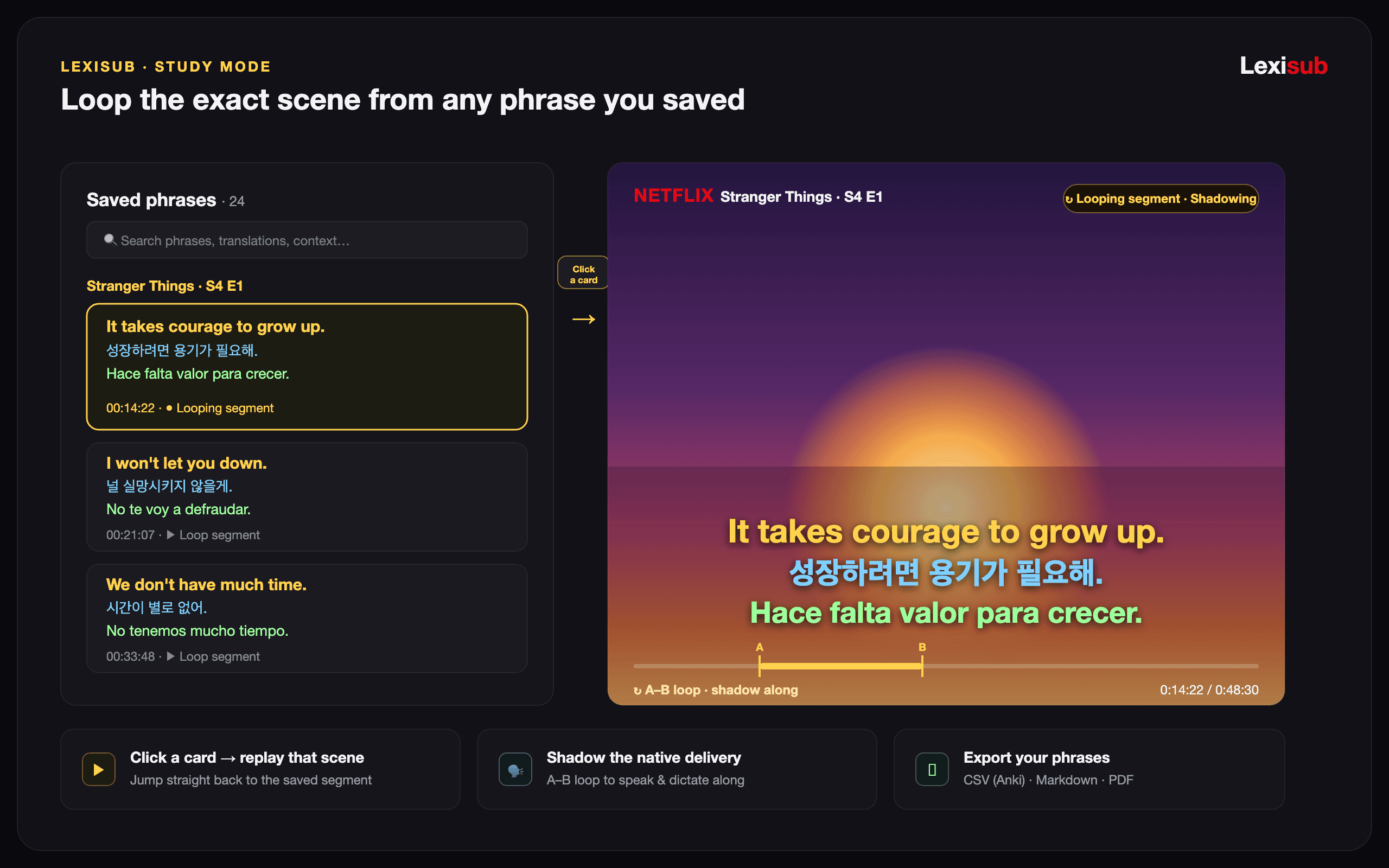
Lexisub study mode: saved phrase list on the left, Netflix player with an A–B segment loop on the right

🔁 Study mode

Loop any saved segment to shadow and repeat. Your phrase cards on one side, the player on the other.

Get Lexisub

Speaks your language — and theirs

Lexisub's whole interface is localized, and it pairs subtitles in any language Netflix carries.

English한국어中文日本語हिन्दीEspañolFrançaisالعربيةবাংলাPortuguêsРусскийBahasa Indonesia
🗣️

Interface in 12 languages

Menus, panels, and tips display in your language — switch instantly from the popup. Right-to-left scripts like Arabic render correctly.

🌐

Pair any subtitle languages

Stack your native language with the one you're studying using Netflix's official tracks — dozens of languages per title. No track for a pair? Generate one with your own translation key.

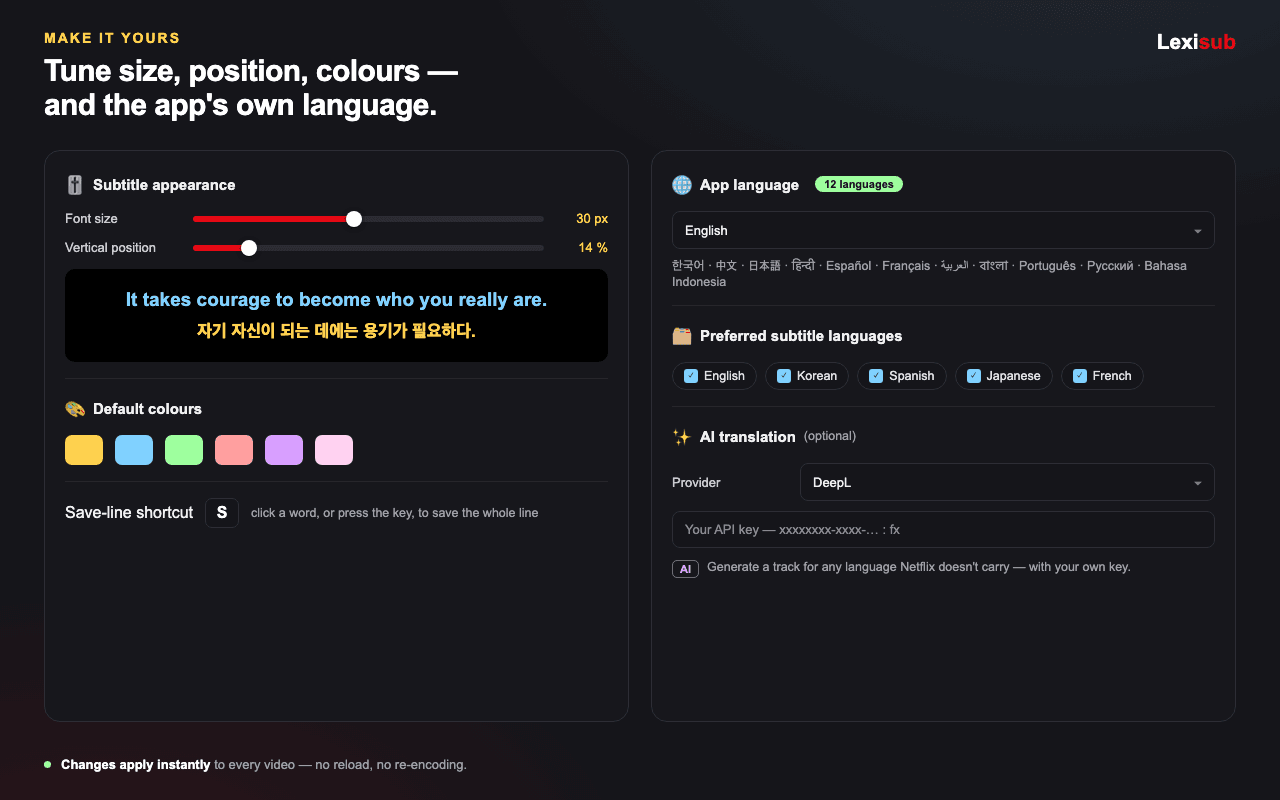
Lexisub settings: subtitle size, position and colour controls, preferred languages, 12-language interface, and an AI translation key field

🎚️ Make it yours

Set subtitle size, position, and colours, pick your preferred languages, and plug in your own AI translation key. The interface itself speaks 12 languages — and every change applies instantly.

Get Lexisub

How it works

Three steps from install to your first saved phrase.

Install the extension

Add Lexisub to Chrome and open any title on Netflix. A control panel appears on the player.

Pick your languages

Choose the subtitle languages you want on screen. Lexisub overlays them, synced to playback.

Save & review

Click words to save phrases, then study them later with export, loops, and side-by-side review.

Pricing

Start with a 14-day full free trial. After that, keep a single subtitle layer for free, or go Pro for unlimited.

Free 14 days
Free / 14 days
Full Pro — no card needed
  • Unlimited subtitle layers
  • Save, export & study phrases
  • Study mode & segment loops
  • Bring-your-own-key AI translation
Start free trial
Launch promo
€3.49€2.49 / month
Limited promo — €3.49/mo after it ends
  • Everything in Free
  • Cloud sync — saved phrases on any device
  • Cancel anytime
BEST · 5 months free
€29.99€24.99 / year
€2.08 / month — save 40%
  • Everything in Free
  • Cloud sync — saved phrases on any device
  • Cancel anytime

Frequently asked questions

Is Lexisub affiliated with Netflix?

No. Lexisub is an independent browser extension and is not affiliated with, endorsed by, or sponsored by Netflix or any other streaming service. All trademarks belong to their respective owners.

How am I billed?

Payments are handled by Paddle, our Merchant of Record. Paddle processes your payment, issues your receipt, and handles applicable taxes. We never see or store your card details.

Can I cancel or get a refund?

You get a 14-day free trial to evaluate everything before you pay, so you only subscribe once you know it works for you. You can cancel anytime and keep Pro until the end of your paid period; we don't pro-rate unused time. Paid periods are non-refundable except where required by law or granted at our discretion. See our Terms for details.

What languages does Lexisub support?

The interface is available in 12 languages — English, Korean, Chinese, Japanese, Hindi, Spanish, French, Arabic, Bengali, Portuguese, Russian, and Indonesian — switchable instantly from the popup. For subtitles themselves, you can pair any of the official languages a Netflix title carries, load your own .srt/.vtt files, or generate a missing track with your own translation key.

Do I need an API key?

Only for AI translation of languages Netflix doesn't provide. Multiple subtitles from official tracks or your own files work without any key.

What data do you collect?

An email address to link your subscription, and that's it on our servers. Your saved phrases and settings live in your own browser. See our Privacy Policy for details.