Use case
Seven Real Ways to Learn Languages Faster on Netflix with Lexisub
Lexisub transforms Netflix from passive entertainment into an active learning tool. Whether you're chasing fluency, building vocabulary, or keeping a language alive, the same multiple-subtitle setup works across every scenario. Here's how real learners are using it.
Language learners often feel torn: binge Netflix guilt-free, or grind Anki flashcards? Lexisub removes that trade-off. By layering two or more subtitle languages on screen at once, synced to the exact moment of speech, it turns every episode into a conversation between your native language and your target language. No pause, no context-switching, no friction. Here are seven scenarios where this approach cuts weeks or months off the learning curve.
Seven Ways Lexisub Accelerates Your Language Learning
1. Shadowing for Natural Pronunciation and Flow
Shadowing—speaking aloud while an actor speaks—trains your mouth, ear, and timing all at once. It's the fastest way to sound less like a textbook. With Lexisub, you see the native subtitle (e.g., Spanish) and your language's translation below it. Pause the player, or use Study Mode to loop a single scene repeatedly. Press "s" to save phrases that trip you up. Most learners spend 1–2 weeks before they can shadow a full episode smoothly; Lexisub cuts that to days by letting you practice the exact intonation and colloquialisms the writers intended.
2. Sentence Mining into Anki for Permanent Retention
Anki works. The problem is finding good sentences in the wild, then extracting them. Lexisub bakes this in: click any phrase or press "s" to save the entire line in every visible language. Group by show, export to CSV at study time. Drop it into Anki or any spaced-repetition deck. You're not memorizing dictionary definitions—you're memorizing how native speakers actually say things, in context, with natural rhythm. A learner mining 30 sentences a week from a single show will have hundreds of high-quality cards within months, all anchored to real dialogue.
3. Maintaining a Language You Already Learned
You reached B1 in French five years ago. Now you're rusty. Re-reading grammar books feels dead. Lexisub lets you switch to single-subtitle mode and watch a French show with French subtitles only—no English safety net. Your brain relearns through pure immersion. If a phrase escapes you, tap the popup to see an English subtitle overlay without leaving the player. You'll regain passive comprehension in a few episodes and active vocabulary in a few weeks—far faster than restarting a course.
4. Exam and Test Prep Vocabulary
Preparing for DELE, DALF, or a language proficiency test? Most prep drills are sterile. Lexisub lets you watch Spanish documentaries about science, history, or business (Netflix has many), and save subject-specific vocabulary on the fly. Study Mode isolates each phrase: split-screen with the transcript, loop it, hear the pronunciation, see both translations. Speakers in documentaries use elevated, formal language far closer to exam conditions than casual dialogue. Combined with your test prep materials, this is a low-stress way to build specialized vocabulary that actually sticks because it's anchored to real content and real speech patterns.
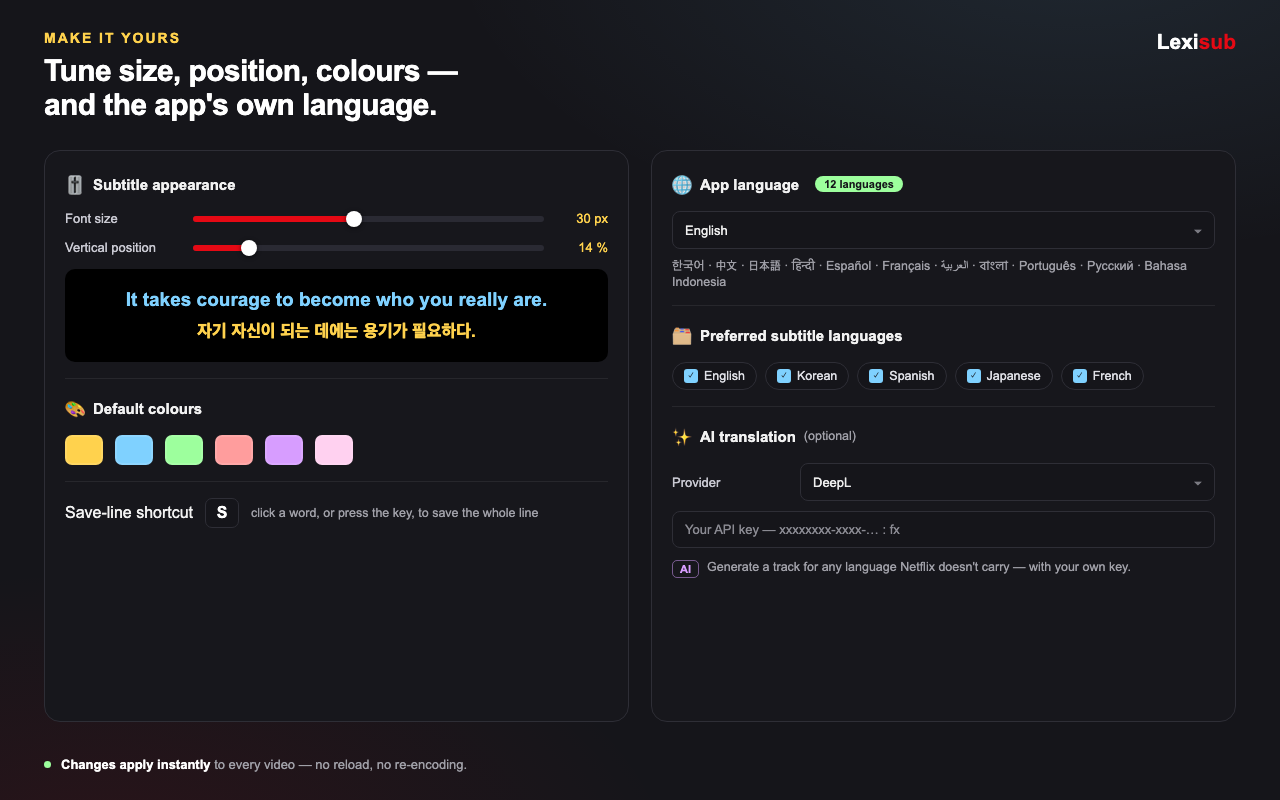
5. Kids and Family Learning with Cartoons
Learning a language as a family is rare outside of immigrant households. Lexisub makes it fun: watch a kids' show (e.g., "Bluey" in Spanish) with multiple subtitles—Spanish and English side by side. Kids absorb the language naturally; adults understand every joke and reference. No one is bored. With Lexisub's customizable colors and font sizes, you can make the Spanish subtitle huge for kids and the English small for adults, all on one screen. Parents often find they're learning alongside their children—exactly the accountability loop that builds habit.
6. Domain and Business Vocabulary from Dramas and Documentaries
You want to work in law, medicine, or tech in another language. Textbooks will never teach you how your target language's legal system or startup culture actually talks. Netflix dramas set in hospitals, courtrooms, or offices use real professional terminology. Save phrases, export to CSV, and you've built a domain-specific glossary in weeks instead of months. Combine this with Study Mode to hear how doctors or lawyers stress syllables, use filler words, and navigate conversations. Authenticity matters in professional contexts—Lexisub gives you that.
7. Casual Binge-and-Learn with Zero Extra Friction
Not every learner wants to optimize. Some just want to watch "Money Heist" and passively absorb Spanish. Lexisub supports that too. Enable multiple subtitles (Spanish and English), sit back, and watch. Your brain naturally starts recognizing patterns. After six episodes, you'll catch words without reading them. After a season, you'll understand dialogue before the English translation arrives. It's not active studying—it's learning as a side effect of entertainment. The phrase-saving feature is there if a word sticks in your head, but there's zero pressure. Many learners start casual and shift to active study once they feel the momentum.
The Common Thread: All seven scenarios rely on the same core: multiple subtitles, phrase saving, and the ability to study in isolation or watch passively. One tool, infinite applications.
Why One Tool Fits All These
The reason Lexisub works across all these scenarios is that it removes the biggest friction in language learning: context-switching. You don't need five apps. You watch Netflix, you see two subtitles, you save a phrase, you export to study later, or you loop and repeat. Everything happens inside your learning flow. And because Lexisub runs locally and only stores your email server-side, you own your data and can export it anytime—whether you're moving to Anki, a notebook, or a new tool.
The 14-day free trial includes all features. After that, the free tier keeps single-layer subtitles and basic saving. Pro (€24.99/year or €2.49/month promo) unlocks multiple-language subtitles, Study Mode, AI-generated tracks (with your own API key), and advanced export. Pick the tier that matches your pace, and start watching.
FAQ
Can I use my own subtitles instead of Netflix's?
Yes. Upload .srt or .vtt files and Lexisub will sync them to the player. Perfect for shows Netflix doesn't have subtitles in, or if you want a different translation.
Will my phrase saves and settings sync across devices?
Phrase saves are stored locally in your browser. Export to CSV or Markdown anytime to back them up or move them. Settings (size, colors, languages) sync within the same browser.
Can I generate subtitles in a language Netflix doesn't offer?
Yes, using AI subtitles. Bring your own DeepL, OpenAI, or Google Translate API key (only runs when you click Generate), and Lexisub will create subtitles on demand. Fully your choice and your keys.