Comparison
Language Reactor & Trancy alternative: how Lexisub compares
If you're hunting for a Language Reactor or Trancy alternative for multiple subtitles on Netflix, here's an honest look at where each tool shines — and where Lexisub does things differently.
Language Reactor and Trancy are both well-known browser extensions for learning with video, and both are good at what they do. Lexisub is newer and narrower: it focuses on Netflix and on the loop of watch → save → review. This piece lays out the differences plainly so you can pick what fits.
The honest summary: Language Reactor is a strong, free, broad tool. Trancy spans many platforms. Lexisub trades breadth for a tight Netflix study workflow — frame-perfect multiple subtitles, one-click phrase saving in every on-screen language, a split-screen study mode, your-own-key AI translation, and a 12-language interface. Feature details on competitors change often; check their current pages before deciding.
Side by side
| Lexisub | Language Reactor | Trancy | |
|---|---|---|---|
| Multiple subtitles on Netflix | Yes | Yes | Yes |
| Official tracks, frame-synced | Yes | Yes | Yes |
| Load your own .srt / .vtt | Yes | Limited | Varies |
| Save whole line in every language | Yes, one click | Word/phrase save | Word/phrase save |
| Split-screen study mode + A–B loop | Yes | Partial | Partial |
| Export to Anki / CSV / Markdown / PDF | Yes | Anki/CSV | Varies |
| Bring-your-own-key AI translation | DeepL/OpenAI/Google | Built-in | Built-in / AI tiers |
| Interface localized | 12 languages | Mainly English | Multiple |
| Other platforms (YouTube, etc.) | Netflix-focused | YouTube + more | Many sites |
| Privacy: data stays local | Yes | Account-based | Account-based |
Where Language Reactor is strong
Language Reactor is free, popular, and works across Netflix and YouTube. It has a polished popup dictionary, a clickable-word reading experience, and a big community. If you want a no-cost tool that spans more than one site and you mostly want to look words up while you watch, it's an easy recommendation.
Where Trancy is strong
Trancy's big advantage is breadth — it works on many streaming sites and web video, not just Netflix, with AI translation tiers. If your study material is scattered across platforms, a multi-site tool saves you juggling extensions.
Where Lexisub is different
Lexisub doesn't try to be everywhere. It does three things deliberately:
- Saving is the point, not a side feature. One click or one keypress saves the entire current line in every on-screen language — not just a single word — grouped by show. That's built for turning episodes into review material, fast. See the method.
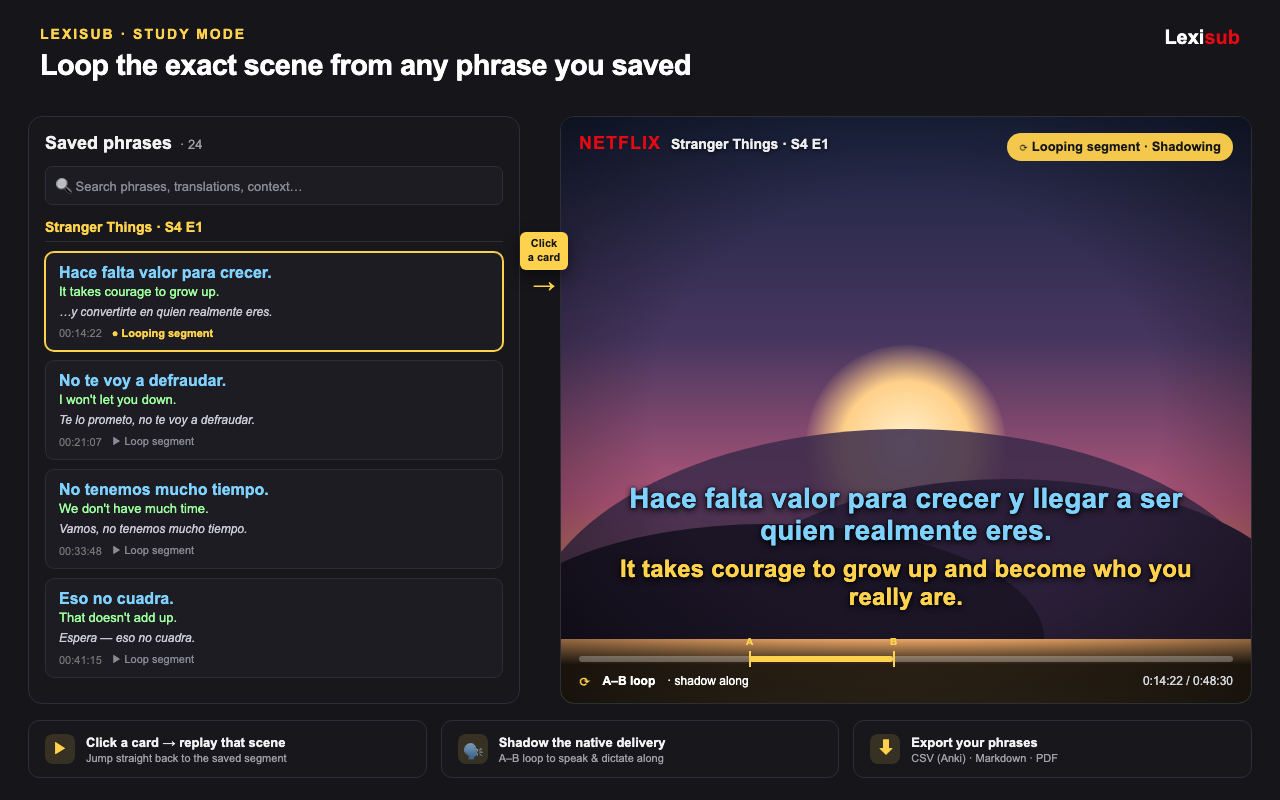
- A real study mode. A split-screen workspace with your phrase cards on one side and the player on the other, plus A–B segment loops for shadowing. Then one click back to full-screen Netflix.
- Your key, your data. AI translation runs on your DeepL/OpenAI/Google key, saved phrases live in your browser, and there are no ads or trackers. The only server-side data is the email that links your subscription.
It's also localized end to end — the whole interface is available in 12 languages, including right-to-left scripts — which matters if English isn't your first language.
Pricing
Lexisub starts with a 14-day full free trial (everything unlocked), then keeps a free single-layer tier. Pro is €24.99/year (≈ €2.08/month) or €2.49/month as a launch promo, unlocking unlimited layers, phrase saving and export, and study mode. Billing is handled by Paddle as Merchant of Record, so local taxes are sorted at checkout.
So which should you pick?
- Want free and multi-site lookups? Language Reactor.
- Study across many platforms? Trancy.
- Serious about building vocabulary from Netflix, with saving + review + privacy? Lexisub — try the free trial and see if the save-and-study loop fits how you learn.
Try the Netflix study workflow
Multiple subtitles, one-click phrase saving, and study mode. 14-day full free trial, cancel anytime.
Get LexisubFAQ
What's a good Language Reactor alternative for Netflix?
Lexisub — a focused Netflix multiple-subtitle extension with one-click phrase saving, a study mode, bring-your-own-key AI translation, and a 12-language interface.
Is Lexisub free?
There's a 14-day full free trial with everything unlocked, then a free single-layer tier. Pro unlocks unlimited layers, saving/export, and study mode.
Does Lexisub keep my data private?
Yes — saved phrases and settings stay in your browser, AI uses your own API key, and there are no ads or trackers.